Wednesday, 20 July 2016

How far Screen size can grow?

Did anyone wonder about the growth of screen size of their smartphone? In early 2000s, people would be tired of carrying a big brick like mobile phone with uncomfortable antenna. Typically, only for the utility purpose mobile phones were used. Within a decade, we started having compact cell phones that fit even new born hands. Now, the situation is reversed! Now, the screen size matters. How good the phone is depend on how big the screen is. Did anyone think small size smartphone usually end up with proportionately small specification?!
I did really wonder it would be hard to have compact smartphone except for few choices in the market that too in price tag exorbitant than normal smartphone. Why manufactures contend on a very big screen? Does screen size really matters? If so, then what would be the status of the tablets which preferably have a big screen than a phone which is expected to fit in our pocket.
Most of the cell phones now show their heads of from the user pockets due to the extra large screens. What made the manufactures to do so?

It is indisputable that smartphones are used for number of purposes. Preferably, for emails, movies, games and so on. But it is true that the very purpose of the smartphone is to do any of the abovementioned activities. Kids have their own priority while business people have their prerogatives and so on. But did anyone feel uncomfortable about the portability of the smartphone expecially if they are short of pockets to carry enough gadgets with them when they go a hands free walk.

Why are the smartphone manufacturers fail to address the need of the compactness when it comes to producing high end devices. They seems to prefer large screen and thin product which looks gorgeous. But when it comes to handling at haste they hardly fulfill the needs of agility. And I hope most manufacturers of smartphone would read the aforesaid concerns before designing next smartphone.

Monday, 16 May 2016

Clash of Clans is DEAD!

I deeply regret to say this again! Clash of Clans is dead. It made me wonder how a top grossing game on Android Google Play Store is as good as dead. May be I got to raid some dead villages. But to my surprise, I found all them abandoned so long ago. For a game, which flourished well in the market, it is so mean.

The effect of the abandoned village is that all I try to get the Town Hall down and get one star. Else skip those village where I do not find Town Hall kept outside the city walls and repeat the demolishing Town Halls. Totally, the raids have turned to be star hunts. No more resources found in storages. No point of raiding the villages.

The effect would be that I may have abandoned the game for approximately 6 months. I just relogged into the game after a brief break and found so many updates, still the villages I raided are as good as dead. For me it was pointless to create troops more than Barbarian. It would be fit to linger on our own collectors for resources than to waste much on the army and the raids. I really doubt no low level player sustains this game. At one point or another, they abandoned their villages for good. For Clash of Clans, it is the worst part.

One thing which really surprised me is my clan was still active and they were accepting and rejecting members into the clan. But for my inactive period they didn't kick me out of the clan. Thanks to them! But the level of resources available in the villages are so pathetic. I think the game shall be more simple than complicating it with more updates. The updates have brought few guards and troops which seems more costlier than ever before.

There may be one more reason for people quitting is rhetoric gameplay. It is open secret how to plan city defense and how to safeguard the resources by keeping them in mid of mortars and towers. With much resources and blogs regarding the town planning in internet, the game spoiled on it own. The frustrated players are tend to abandon it and look for some good time waster. Better, some innovation is needed to kindle fire in Clash Of Clans.

Please leave your comments and feedbacks in the below. Both positive and negative comments are welcomed.

Sunday, 20 March 2016

How to install Proprietary Driver in Ubuntu?

For those who are searching for Proprietary drivers For AMD Graphics card in Ubuntu, here is the solution. Follow them, the very purpose of this blog is to DIY solution to problem. As an interest, I myself make entry as such for future reference. Instead of copy and pasting something, having it on blog is good. Next time, I will try bookmarking services to keep tab on interest areas.

Sunday, 13 March 2016

How to Boost Cell Phone Signal?

Hi all,
This is not a blog post about boosting signal! I am actually trying to find DIY solution to boost my cell phone signal without any commercial Signal Booster(s) in the market. All I am trying is find out solution with tools and products which are usually available at any home.
Most of my work was to use a thin copper rod/cable believing it would receive Electromagnetic radiations from streets. But it is not easy as I believed. My 4 years of work in IT has never exposed me to antenna technology. I am suffocating much with amateur idea of boosting signal with copper wire. All I know far now is I can boost signal, bend signal using antenna which I gained through books which imparted some kind of basic mobile computing during my undergraduate programme on communication. But in reality, it is not as easy as something stated in the book. It mock me with difficulties. My idea is if I can pick up signal which I usually get in my smartphone when I am in street, then sure, I could bend or make it available in my office room which is not even 10 feet from the street. To be frank, I can see the street and house built in opposite plot. So It must be simple, expect for some practical knowledge which I lack due to no exposure in the field of communication.
IDEA FOR CELL PHONE BOOSTER
IDEA FOR BOOSTER


Simple solutions:
It might work of most people out their searching for DIY solutions who like me, don't want to spent on those market boosted cell phone repeaters and boosters.

  • Know where you service provider tower resides in your local area. Know where it is present from your house. In my case it is on north side of my house, but far away.
  • Move near a glass window, preferably on the street side because we usually would not have any problem with cell phone signal if we step out of our house.
  • Open the glass window which would face against the cell phone tower, make the window open until it is 45 degree so that you get atleast one or two bar boost in your phone.
It helped me a little when their is no signal at all in my phone. But it is just a trick where you can get boost only by a bar or two. Still it will lack signal quality. So it not dependable as we could depend on commercial signal boosters. So still I am trying to figure out how to make those copper cable act as a Passive Signal Repeaters. If it gonna work then it would save some serious bucks from those after market signal boosters. Yet, some people cry that boosting signal is against standards. But what could we do if you do not get due care from our service providers? 

BTW, I plan on trying to install a Radio Transmitter antenna to check it reception when it comes to mobile signals. If it would work. Then soon DIY simple passive repeater could be assembled at ease.

But all my efforts were fruitless. It ended up in vain. I miss something is very essential in the mobile phone signal processing. Like some electro magnetic absorption in the copper wire. I can't get it passed. Still my cell phone shows dumb zero bar signal.

One good thing about the cell phone tower signals is that old Nokia which was lying unattended in my room bailed me out of the zero bar situation. I wonder what made it pick up signal. It is a basic model phone nothing but a message and call function. Nothing more was added by the Nokia in its device. Surprising it worked better and picked up signal even in the dark corners where my Asus smartphone failed to pick up signal. Even a call made on availability of 'single bar mobile tower' worked perfect without any issues. The voice clarity was so good that I did not feel I was talking when single bar of the mobile tower showing up. With my limited technical knowledge, I cannot figure out what made my unattended Nokia phone to pick up signal so strong and what made my costly Asus zenfone to have zero bar and poor call quality if I drop from 4 bar to 3 bars tower! Only a technically sound guy could clarify the issue. 

I will come back when I find a way to boost signal using those copper wire. Please feel free to express any idea to boost signal with copper conductors alone.

Sunday, 25 October 2015

Kabam: This Means War

Hello all, this is my second day on This Means War by Kabam. At first day review, I felt it similar to Clash of Clans game play. With same system implements it looked identical. But today, I tried attacking few bases through multiplayer battle. I was surprised that Kabam has decided to make the warfare to the another level. While I attack bases, even my base is exposed to opponent attack. The It drew some imaginary battle line from which we could deploy our forces for attack. The moment when the forces reach the opponent base. A wave of enemy attackers launch attack over my base. Wow! It risk my resources to be plundered by the opponents. It looks like war between neighbors. Still, it is a war game.

One big difference when it comes to raiding opponent bases is that, we can redeploy forces fallen in the battle. So we get unlimited supply of troops but limited by same set of units. Example, if you have one rocket trooper in your whole attack unit. You can deploy back only one rocket trooper for the whole battle. Well, lets see how this game play go after each upgrade.

With Command center upgraded to level 3, I was able to join alliance. The difference is not a big deal. As usual, we can send or request reinforcements from our alliance member. Also some parts could be requested from your alliance. But for now, I been raiding enemy bases like mad.

Unfortunately, I found my base attacked and a shield protects my base right now. Let see what happens next.

Tuesday, 20 October 2015

Kabam: This Means War

This is my first day playing 'This Means War' by Kabam. Google Play recommended to install this game. Out of curiosity I installed it. Basically, it is action strategy based game. So far, the tutorial were based on Single player mission. Nothing much on the part of Multiplayer as I had in Clash of Clans, Invasion, Royal Revolt...

Basic Terminology:

The intro part has exposed towards the basics of the gameplay. And for the purpose of this post, I will list few of them.

Power Cells: These are the elements which could be bought for some real money. Like I would be diamonds or gems for real money in other games. No surprise, you have to make deal with Kaboom for the speed ups.

Engineer's Tent: Though it may spell and pronounce as Engineers, it would simply call them builders employed in your base. At first, you would be kept incharge of a war base as usual. Nothing new on this part. Number of Engineer Tent decide how many constructions could be made simultaneously.

Command center: It is the heart of the base. It decide how many building and types of such building shall be present in your war base.

Supply collector and Storages: To be frank, I really wonder who send supply 24x7 in this game. But you will receive supply relentlessly. In this place, you could collect all your supply that have reached your base.

Red Mercury Collector: This is the vital resource of your base. Sorry, this is want the intro said about the resource. So I hope it will be the vital resource to reckon with.

Army Camps: It is the base where your units stay all day. The units must be produced from a separate barracks.

Gameplay:


Basically, I started the game under a shield. I lose shield if I enter multiplayer battle. Once I lose my base to an attack, then I gain back the shield. Feels similar to Clash of Clans where people farm with TownHall outside the walls. But for now, I would not make a flat assessment.

There are three types of game who can play. Single player mission where you fight against a Major ranked officer, one against friends and last one is multiplayer battle.

Gameplay is all about building troops and fill the army camps. Then launch attack! You end up looting resources from other bases if you win the fight. 

Overall, my first day at 'This Means War' feels like I am in another replica of Clash of Clans. The setup seems similar to that. Lets wait some time, to know more about the multiplayer feature of this game. If my base could be attack even if I am offline then it would be exact replica of Clash of Clans. So stay tuned to know more about this game.

Sunday, 27 September 2015

How did I fix dead Lenovo Laptop

I was happy with my Lenovo T series laptop which is working perfect with no flaws since 2003. LOL! Even I forgot the model name. That old is the laptop about which I gonna talk about. With arduous service, the laptop died 2 weeks ago. The death was without any symptoms. A sudden death! Nothing but a black screen gazed at me. So thought of buying a new laptop. Still, to try my luck, I browsed few forum regarding my issue (though I didn't post my question or problem). I found a crazy bit of information which was weird at first. But works actually.

The info was how to reset your apparently dead Lenovo laptop. The information was quite simple yet effective:
  1. Unplug your AC input cable and battery from the laptop
  2. Then press power button 10 times each with 1 second intervals. Then press and hold the power button for 30 seconds.
  3. Insert your battery and boot your laptop as usual. It will work!
  4. Remember, do not plug in your AC adaptor cable before booting the laptop. If you do and your laptop dies, repeat from step no. 1.
As stated above, the steps seems weird. But to my surprise it did work! For those who use Lenovo laptops must remember these steps if you find your laptop not responding to the boot request.

And for your information, I forgot the source of the website forum. I just desperately tried these steps. It worked. So writing about it as it may help others. Once I get to know the real source, I will post them. If you know, let me know! If your laptop didn't get fixed by following the aforesaid steps, kindly leave a comment about your problem.

Thursday, 24 September 2015

How to extent Wifi coverage with second router?

With those who use wooden construction material can move on with this blog post. But for those who still complain about the black spot or patchy WiFi connection inside the house, You are in right place. I am not going to present with some cut and paste article from another website. All I am going to present is my personal experience of setting up WiFi connection and extending it to increase the coverage area. Technically, to fill black spots where you won't find signal with your existing Wifi router.

To begin with you need basic things. Before getting started, have the following ready:
1. Two WiFi routers
2. Lengthy CAT 6 cable
3. PC/Laptop to connect and configure routers
4. Some patience and time. Most of you reading this article may try it for first time. So if you do fail in your first attempt, congrats! Be proud that you started learning something new!

Alright! Now let's get started with our setup.

1. First of all, decide upon which router will be your primary. It should the router which gets internet directly either through a modem or wired connection. Fix this modem as your primary router so that you can extend connection from it to the slave or secondary router.
2. Note down following configuration information from your primary router. If you are unaware of how to know those information. Open your web browser and type in the IP address of the router. In most case, it would be 192.168.1.1, if your are using D-Link router, try 192.168.0.1. For those who find this difficult may refer the user manual of the respective router. And for configuration information, following details of from the primary router may be noted:
  • wireless mode
  • channel at which primary router works
  • security settings like WPA, WPA2, WEP
  • Passphrase of your primary router
  • DHCP addresses of primary router
3. That's it for the info you need from primary router. Now reset your secondary router and connect it your PC/laptop. Make the following changes to make it slave of your primary router:

  • Click the LAN settings page and edit the IP address of the router to be one of the Static IP address under primary router. For example, if your router provides IP address in the range of 192.168.0.2 to 192.168.0.49, fix the IP address of the secondary router within this range. As our case is for home connection, I would highly recommend using last IP address which would kept idle! So in this case, set the IP address of the secondary router to 192.168.0.49. Hit save and let the router reboot.
  • Now, enter the new IP address of the secondary router and select 'OPERATION MODE'. Set operation mode to 'bridge'. Then hit save and wait until router reboots with new configuration.
  • Again login to the configuration page of the secondary router. Now, change the basic wireless settings to match exactly with your primary router. ONLY EXCEPTION IS ASSIGN DIFFERENT SSID TO YOUR SECONDARY ROUTER. Apart from that, change all the values like channel, security, wireless mode and it must exactly match your primary router. Now hit save and let the router reboot.
By now, you have made your secondary router work alongside primary router which would extend your WiFi connection fill black spots in your home. To connect two routers, you could prefer long Ethernet CAT 6 cable. To establish connection, plug one end of the Ethernet cable in any one of the LAN port in your primary router and plug the other end in any LAN port of your secondary router.  Place the secondary router well away from primary router to extend the WiFi coverage. That's it. It must work now.

For this experiment, I had the following equipments:
  1. D-Link 816 wireless modem/router.
  2. ZyXel wireless router (I had a spare router in home)
  3. Cat 6/ Ethernet cable (any of them would work but make sure it is of good quality)
  4. Ofcourse, an internet connection in working condition.
Nonetheless, power source is far more important. Do not forget to plug in your AC cable in your routers.

Friday, 17 July 2015

Twitter Hashtag creation Guideline

Twitter Hashtag creation
Twitter hashtag Creation
Did you know the quick and easiest way to have reach in Twitter? Haven't you found potential customer in Twitter? If not, something is probably wrong! So much money being spent on Twitter campaigns for product promotion yet waiting to harvest the gains! Now, to answer all this question. Ask yourselves now, what is your Twitter campaign hashtag? If are able to answer, you are half way done in your Twitter campaigns.

Most successful online campaigns in Twitter has striking similarity! Unique hashtag! If your Twitter campaign owns an unique hashtag then you are more than half way done in your twitter campaign. The problem is finding the unique hashtag. Brainstorming begins here! The only problem with creating hashtag is making it unique and must always point to your product or service in Twitter.

It is your one and only problem. Yet you could overcome the difficulty with flying colors, if you are ready to set proper strategy for your Twitter game. No surprise! Follow the simple guideline for Twitter hashtag creation:
  1. It must be unique! Unique in the sense it must not be used by another person in Twitter. It doesn't matter if some one has made no significant reach with similar hashtag but be careful that neither of your hashtag overlap with each other.
  2. Do your research prior to establishing hashtag in Twitter. Once you have made decision, you will lose your right to recall Twitter hashtag once your followers starts buzz with it.
  3. Make sure it is more relevant and specific to your products and services. An generic hashtag would lead to overlapping of hashtags in Twitter. For example, #blogger in twitter indicate both using Google Blogger service and those who blog on any platform. So, make sure you are specific to your product.
  4. The point #3 should not be made beyond the point that it breaks surprise to your Twitter followers. Relevancy and specific detail should not let your followers know about the surprise that awaits them till launch date. In simple words, your Twitter hashtag creation must create buzz among your followers but should not in anyway giveaway the surprise element.
  5. The time of hashtag establishment is far more important! Make sure it go viral the moment you launch your Twitter campaign. Analytic tools are best friend when it comes to launching campaigns in Twitter. Once you get infographic about your followers activity in Twitter, you can make sure you get your product hashtag go viral the moment you tweet it on Twitter.
These 5 Twitter hashtag creation guideline will help you reach your potential customer through your Twitter campaigns. Something catchy will always get attention in Social media.

Saturday, 4 July 2015

Google Chrome user? Working for Google!

'Google Chrome has recently taken over as the most popular internet browser with over 750 million active users.' - Kissmetrics Source: visit here.
Google Chrome web browser work for google
Google Chrome
Source: wiki
The statistics is true! And one must know how serious it is to know Google Chrome has taken over other web browsers in the past decade! Well, one may advocate that Chrome is product of open source web browser project Chromium. Though, the origin seems to be legitimate open source project, Google has its work mend with the Chrome! Chrome comes with lot of strings attached. Most strings entice users to keep using it! First and foremost is the Support! Google provide support for Chrome while Chromium it is upto the community! Not only the support! Google Chrome store is one of the highlights! You get lot of plugins, games and utility. To say, it would act as one stop place to get your work done with your chrome. Those strings contain few messes that most users ignore or ignorant of.
But still I have to admit that I myself is one among those who fan Google Chrome! Yeah! It is well designed and satisfy user experience with lot of utility and plugins which I can't reject for no good reasons. Still Chrome features outweigh the intention of Google! I am not trying to villanify chrome project. A few good things comes with a cost! So the Chrome. It is free then you pay them with kind of something most people not aware of! It is time to shed some light what chrome user actually do to Google SERP!
Stop it! Did you hear me saying Google Chrome users help determine SERP? If yes, do not read back! You heard it right! If you are a Google Chrome user then you are indirectly work for Google! To make it simple, haven't you heard that Google tracks users data on Chrome browsers? If yes, fine. If no, yeah, Google tracks users browsing data. Simply, If you use Google Chrome then you provide Google with tons of data each year about the sites your browse, bookmark, shares and so on! Not to freak out! Google never collects personal data. Just relax! It is all about SEO or Search Engine optimization. They simple use the information collected to improve SERP.

What the hell is SERP?


So far I would have used SERP! If your new to these kind of stuff, then I am glad to introduce you to these terms. SERP is simply called Search Engine Result Page.

'A search engine results page is the listing of results returned by a search engine in response to a keyword query. The results normally include a list of items with titles, a reference to the full version, and a short description showing where the keywords have matched content within the page. A SERP may refer to a single page of links returned, or to the set of all links returned for a search query.' - DuckDuckgo Goodie

Alright! the definition is good enough to explain anyone who are new to these terms! Now business!


How using Google Chrome helps Google?

As you all, title is about how Google Chrome users work for Google! Yeah! The data we provide Google while we browse in Chrome is work we do for Google. Though it may not be compared to actual work we do to Google. Yet, it is valuable enough that it improves the SERP of the popular Search Engine in internet history!

Bookmarks: If you are person who bookmark web pages which ever you find useful or thinking of reading them later. You made Google note of the importance of the web page you visited. If a single page gets bookmarked by lot of users in Chrome, Google indirectly understands the importance of the web page the user visited. God damn it! I forgot to bookmark my own blog! Well, many of them must bookmark it! One or two not going make it a day.
Ad revenue: I guess, it must be the top priority for any company who provides top notch service. All we know is good provide service free to the users but charge advertisers for the ads. I am not going deep into the working of Adsense now! To keep it simple, lets stop with Google make revenue from ads. Alright, your browser history, pattern, cookie help Google Ads pop up appropriate Ads. So it augments revenue! If they find you were browsing for a designer apparel then Google Ads going to throw you with ads from apparel websites! So the ads get relevant with your desire. So the click through rate of the ad is high. Thus increase the revenue.

Chrome Store exclusively for Google Chrome web browser
Chrome Store

Google Service: None could undermine, Google product services! Google knows if anything goes wrong with its product if the users use it from Chrome web browser! Not a surprise though! I tried loading Google services on less popular web browsers and found out that even the login form loads crazy! Finally, it made me realize that Chrome is something special than other web browsers when it comes to dealing with Google.

Well, the list here is short! We do like it or not, Google Chrome is a win-win for users and Google. Google improves Chrome and we provide input to improve chrome. It has evolved as chain action. Last but not the least! I personally prefer Chrome!

Tuesday, 30 June 2015

Google+ Social Media platform help SEO

Google+ social media platform help SEO
Google+ Social Media

Google+, social media platform, where most of the socialmediaprenuers neglect when talking about social media issues! Well, actually, I do not mean to generalize and state all socialmediaprenuers neglect Google+. The complain is they do not get the reach as do they do in other social media such as Twitter, Facebook. Twitter and Facebook had an edge over Google+. Both them are old and were leading at the time of Google+ was in infant stage. Might be, bad luck at the time of launch! Most of the Google+ get attention due to the Google account and its integration with all other services! For now myth apart! What makes Google+ important?

  • Dofollow links: Well, if your content go viral in social media platform, will it guarantee your search engine presence? What if your social media campaign hits top in SERP? Would you say no? Any body who works on social media would answer it in negative! So to make it simple, yes, Google+ links are dofollow links. If some one don't know what are dofollow links, these are the link search engine bots will follow and crawl from the page where the link is in existence. So Google+ gives your post or blog to the Google search engine! Though, it will not improve your SERP ranking to significant level, it would make your website crawled by search engine. Well, if you are targeting Google SERP, then it is a wise choice to utilize Google+.
  • Share and +1: If someone does know share and +1, then they are not really good at Google+. I assume you are well aware of Google+. So each time your content gets shared and +1, your probability of getting higher up on SERP is high! These are not myth but it was proven methods employed by social media marketers! Even Twitter and Facebook has such ability, but Google+ is make significant difference to your SERP.
Action plan: If it is your business or blog, whatever it might be, it is good to have presence is all possible social media! Even if not in all, it is good to maintain interaction between your followers and your business through popular social media platforms. So make sure Google+ is one of them! Even if you don't get adequate followers, it is good have your presence in Google+. Even if you have one or two followers, their is high chance of such followers sharing about you with Google+ circles. Thus increasing your reach and popularity!

Myth: Most popular myth that evolve around Google+ is it is dead or expected to be dead! Some social media experts would cite the case of orkut and compare Google+ with them! Even orkut was owned by Google, it has to meet its death on Sept 30, 2014. So they anticipate such fate for Google+. Even it may be true! Who cares! It is good to maintain your presence until the network is live and active! So lame reason for neglecting a social media shall be the story of past. Start engaging with your followers via Google+

Sunday, 28 June 2015

Buffer.com Tutorial: Social Media presence augmentation

I will assume that those who are reading this blog post are the people who is using Twitter as the Social Media Platform. Though, there exist many other platform such as Facebook, Google+, Pinterest and so on. This blog will cover augmenting Twitter presence with Buffer. Twitter is great social media platform as you will find far most reach than any other social media platforms. You do not need a campaign to gain reach in twitter. All you need is a little bit of intelligence to gain the reach to the target audience! So lets play with Twitter now.

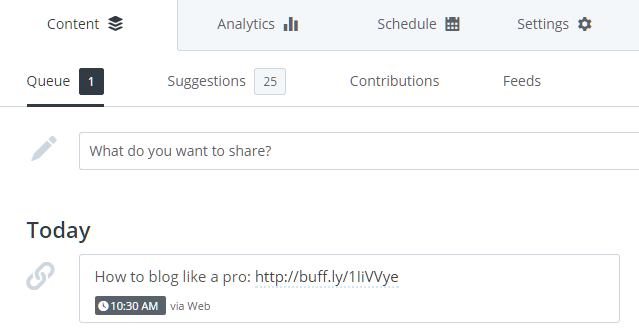
So now coming to the tool managing your Twitter account. It is time to work with Buffer. Buffer app helps schedule tweets to your Twitter account. If you haven't tried Buffer till day, now it is time to try it. Though it may appear as simple tweet scheduling utility, it will come with inbuilt analytic for the tweets posted via buffer app. So you get insight into the potential of your tweets, reach and engagements from fellow Twitter users.
Buffer.com Twitter analytic
Buffer.com
Take a close look at the image posted above! Do you wonder what made big difference to those tweets? This is what the objective of today's blog! What made that great difference to the tweets? Most of us would under estimate the analytic data! A short version of the analytic would prove that posting at right time will get lot of visitors to the tweets. Still, a little chuck of socialmediapreneurs would argue that hashtag has made the great difference! Well, if it so then here is the evidence to prove it otherwise. 

Getting engagement on social media platform, especially, when it comes to Twitter, it depends on variety of factors as mentioned below:
  1. Posting Time: At which time of the day, you schedule your tweet is far more important! So if you are planning to schedule your tweet in Buffer then it is good to brainstorm the timing of your tweet. When most users would be online? Your reach depends on number of users online. The impression of your tweet with online users would augment your presence. While you can not use it as thumb rule! Each niche has its own peak time. To find out when you will get more reach depends upon your experimentation with Twitter. So If you are tweeting your niche then it is good to schedule your first scheduled tweets by distributing it equally in the day. It is effective method if you try it for a week to know more about which day and time, you get more engagement.
  2. Followers: Well, it is factor which is beyond your control. Your engagement, at least for first few engagements, depends upon your followers. Twitter is like domino so it depend upon the one who first engage with it! Think about one of your followers who has some 400 followers in his account. What happens if he retweets your tweet, your tweets is visible to some 400 more users! What if the case if some with 75k follower retweets your tweet? That is your tweet potential. So know who might retweet or engage with your tweet once posted.

    Though it might look little naive to know followers, it is good to know your audience. As I stated earlier, this is factor which is beyond our control. Could be able to control who follow us? Damn! It is not Facebook! So you have got to manage with what you have got! But it is nothing to worry about. Twitter is all about engagement! You are not going to gain anything with just broadcasting your tweets. As far as possible make it engaging! Engaging tweets gets good amount of impression among online users.
  3. #Hashtags: Comes the most debated strategy among socialmediapreneurs! But the truth is using hashtags gets wide reach among online users. If your tweet is related to trending topic in the Twitter then you have wide reach than expected. The impression of your tweet is many fold as trending topics usually have considerable population of Twitter users interacting with the tweets posted, either they like it or not. So planning your #hashtag usage is very important factor.
Yet never use too much hashtag than expected. If you wish to have wide audience then it is good to plan your posting schedule accordingly. Using too many hashtag will make users assume that you are spammer! Yes! Most of the tweets in Twitter are spam, advertising products. Worse part is it includes false advertising. Even I have received DMs and mentioned tweets stating about job opening. But clicking the link will lead you directly to a dating site or provide a survey in which we have to sign up! So spams are too common. So make sure you do not gain the spammer tag in Social Media. So avoid using too many hashtags in your tweets. Better try using maximum 3 hashtags!
Twitter tweets using Hashtag
Twitter Tweet using Hashtag!

For instance, consider that you are going to tweet about a topic, say 'wordpress seo plugins', good we got the keywords. If my math is right, we got 3 keywords for utilization. To draw maximum attention, I would use it as

'Top #wordpress #seo #plugins for your blog'

That's it, actually it will sound like a true sentence! But most of the tweets which I encountered where poorly written. For instance, the same statement was written as

'Top plugins for your wordpress blog. #wordpress #seo #plugins'

In the above mentioned example, we lost word economy. Note this point, no one will read it deeply as they do it with story books! You must catch attention in the first look and make the user engage with the tweet.
Buffer.com Tweet Scheduling
That's it, the above mentioned factors work well for creating text of your tweet. Now it is time to use Buffer to schedule them to your need!
Now, Login into buffer.com! If you did, then you are holding a basic account which let you schedule maximum 10 tweets in queue. So it is limited functionality! Never mind! We could get our initial reach through these 10 scheduled tweets. So at initial level you do not need an 'upgrade to awesome'. 
Now click on 'What do you want to share?' and compose your tweets and click on 'Add to the queue'. That's it you have scheduled your first tweet! First part is over!
Next, we need to analysis our posted tweets! Buffer app comes with inbuilt analytic system which will track tweets posted using Buffer. If you wish to experiment with your niche schedule 10 various tweets of same niche to the queue at different time intervals. So that you may get insight of the audience that you might reach next! If you get too much of positive response at particular time, then it is good to mark it along with the day and time in the week. We can assume we might get good reach to the target audience with minimal efforts on those day!
Important: There is no hard rule to rule social media. your initial reach depends on your experimentation! Don't relent until you complete the objective!

Saturday, 6 June 2015

Must Try Twitter Management tool to Increase Social Media presence

Anyone who is serious about Social presence must try these tools

best Twitter tools
Twitter tool Everyone must try

The importance of social media which has direct influence on brands, sales, marketing has reached far from mere social networks that are used to connects friends to connecting end consumers with brands and products. A product or service neglecting its presence in social media will not find its day on internet. Have you seen any blog/product without social media share buttons? I guess answer would be no. Now such social media presence is just clicks away. One of the most powerful and convenient such network is Twitter. When you are working for a brand, managing the official Twitter handle would be tedious if are serious on targeting audience. Apart from promoted tweets, tools to manage followers, list, tweeting on updates are importance aspects which cannot be neglected by any social media marketer. So for those who are busy with Twitter handle must try the following 4 awesome tools to manage Twitter account.


TweetDeck Twitter management tool
TweetDeck

#1. TweetDeck: TwitterDeck by Twitter. For those who wish Twitter in new form, TwitterDeck is place to start with. It is easy to use, simple interface. Instead of boring 'new tweets' notification, Twitter Deck uses live update news feed reels. The interface look like running a football commentary except here it is tweets from various people. The reel gets updated every second. But make sure you have adequate bandwidth for the month. 'Activity' column consumes most data as it provide far more update than your home page Twitter feeds. 


commun.it twitter analytic tool
Commun.it

#2. : I may face ire of commun.it fans for placing it in second position. Placing it second doesn't mean it lacks features or inferior to others. It is a powerful Twitter Analytic tool for anyone. The sole object of commun.it is to create engaging user experience. Provide analysis on whom to follow and unfollow, who retweeted, top followers and so on. But basic free version has its own limitations. 20 social engagements per week and tweet scheduling is available only in the pro version.


Buffer.com  for all social media
Buffer.com

#3. Buffer: Commun.it paid version supports tweet scheduling. But buffer prime purpose is tweet scheduling. It comes with analytic tool. It provide insight on which tweet you received clicks and number of visitors who checked the tweet. As always, buffer free basic version has its own limitations. You can schedule 10 tweet if own a free account. It is up to you to manage those 10 scheduled tweeting.


hootsuite.com for Twitter
Hootsuite


#4. Hootsuite: Hootsuite is effective twitter management tool. Actually Hootsuite is overall social media management tool if all the features are taken into account. You can manage all popular social media accounts from Hootsuite. If you haven't tried hootsuite, you must try it today. It is a must have tool for all social media marketers. I didn't find any restriction as I did in buffer. No limit on scheduled tweeting. Limited analytic capability for free basic account. For serious social media marketers, bulk tweet uploads are available in pro version.

Each tool has it's own merits and demerits. If you are able to use all the tools, then you can create your own business with these tools and take control of your social media experience.

Wednesday, 3 June 2015

Tutorial: Add Original Social Media Share button on Blogger

For any one who uses Blogger platform to create blog will be provided with stock old share button which would be hardly noticed by the readers. All of them are small icon which is most of them might ignore if someone do not read until end of the post.
Blogger default social share plugin
Default Blogger Share Button At the end of Each Post
But most of us wish to have social share button which would stick at a fixed position, so that it might appeal to the reader for a share. Unlike Wordpress, Blogger is short of plugin libraries. But this fact will not going to stop us from creating our own floating Social Share Button for Blogger.
Floating Social Share Button for blogger
Floating Social
Share button

To create your own social share button, you do not need a expertise knowledge as a professional web designer would do. All you have to know is simple Ctrl+C and Ctrl+V technique. It would not even take 20 minutes to setup your own floating social share buttons on your new blog. All you have to do is simply follow the steps mentioned below. 

Unlike other tutorials, I am not going to instruct on how to edit Blogger Template to add Social Media Share Button.

Steps to Add floating Social Media Share Button:


Step 1: Collect code from all social media website to which you wish keep share button. This is important but tedious job as you have to collect share button code from all your desired social networking websites. But Search Engines would help you find relevant code.

Bing Search for Twitter Share button

In this instance, I made a search for Twitter share button in Bing. The first result was the official Twitter page which help you create 'share' button for twitter. 

Twitter share button for blogger
Twitter Share Button Code
Now, copy and paste the code which is provided in the code box to a notepad or text editor which ever you wish to use.

Similarly, collect code for facebook, Tumblr, google+, etc.

Step 2: Now goto Blogger.com. Enter your credentials and open up your blog to which you wish to add Social Media share buttons. It is simple as adding a widget when it comes to blogger.

Step 3: Now Select 'Layout' from the side bar. You will see the layout of your  blog.
Blogger Layout selection
Select Layout
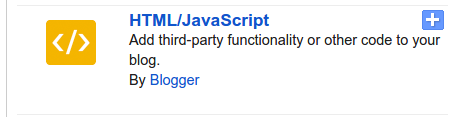
Then select 'Add a Gadget' in your layout window. And now select 'HTML/Javascript' gadget from the menu. 


HTML javascript Widget
HTML/Javascript Gadget

Step 4: A window will open with two text boxes. One for title and another for pasting your HTML/Javascript code.
HTML/Javascript Gadget box
Now copy and paste all the code from your notepad or text editor in the 2nd text box as shown in the figure. Next is to make it floating in your blog.

Code:
<style>
.pos_left{
float: left;
position: fixed;
left: 10px;
top: 200px;
}
</style>

This above mentioned piece of code is called CSS or Cascading Style Sheet. It is responsible for the design of you web blog. Now, it is made so that our share button floats on the left side of the screen.

Merely adding the above will not make your bar float. You have tell when the style code to get activated.
Code:
<style>
.pos_left{
float: left;
position: fixed;
left: 10px;
top: 200px;
}
</style>
<div class='pos_left'>
<a href="https://twitter.com/share" class="twitter-share-button">Tweet</a>

<script>!function(d,s,id){var js,fjs=d.getElementsByTagName(s)[0],p=/^http:/.test(d.location)?'http':'https';if(!d.getElementById(id)){js=d.createElement(s);js.id=id;js.src=p+'://platform.twitter.com/widgets.js';fjs.parentNode.insertBefore(js,fjs);}}(document, 'script', 'twitter-wjs');</script>
<div id="fb-root"></div>
<script>(function(d, s, id) {
  var js, fjs = d.getElementsByTagName(s)[0];
  if (d.getElementById(id)) return;
  js = d.createElement(s); js.id = id;
  js.src = "//connect.facebook.net/en_US/sdk.js#xfbml=1&version=v2.3";
  fjs.parentNode.insertBefore(js, fjs);

}(document, 'script', 'facebook-jssdk'));</script>
<div class="fb-share-button" data-href="https://developers.facebook.com/docs/plugins/" data-layout="button_count"></div>
</div>

The above sample code contains share button for twitter and facebook. If you wish to add more button for shares, you can place your code between div tags.

For novice users, you can simple copy and paste the code in HTML/Javascript Gadget box in your blogger layout.

Note: All share code is from official Twitter and Facebook web page. No editing has been done to the code except for the CSS and div tag additions.

If you like the post, please share to all your social media. And this tutorial need some knowledge of HTML, CSS and javascript. So not everybody can understand in a single go. So patience is your best friend. Trail and error might get your problems fixed. If you find any problem please report it in comment section.